Sheryl
MemberForum Replies Created
-
Strange, the emails notifying me of a follow-up post all of a sudden started getting trapped by my junk mail filter. Weird.
Josh, I tried your code and nothing displayed, that is no static text, no posts. Then I noticed a <?php endif; ?> after the first </div> which didn’t seem to have a corresponding “if” so I deleted that and things again began to show up. However, the date “graphic” appeared only once (or perhaps they all appeared on top of one another) up in the top left corner of the page, and all the right column widgets showed up at the bottom of the left (main) column. And no “spacer” between posts, either.
Screen shot here: http://www.resourcingchurches.com/screenshot-11-09.png
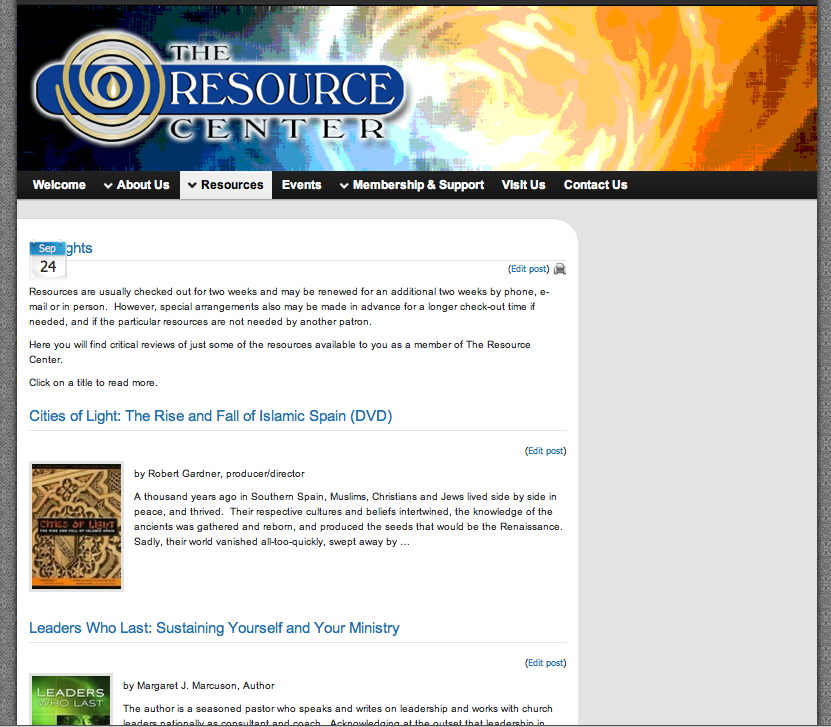
I do have it activated. Here is a page where it is being used, with the setting of the “default template.”
http://66.147.244.91/~resouri7/wordpress/resources/highlights/
And here is a place where I’ve simply redirected the page (menu item) to the category archive.
http://66.147.244.91/~resouri7/wordpress/resources/insights-on-the-lectionary/
One thing definitely missing in the former is the “Continue Reading” button – the novice user might miss those little “…” at the end and then still not know to click the post title to get the whole post.
Totally! I’ll admit I looked at the settings page for the plug-in and was a bit overwhelmed, even the tutorial wasn’t much help.
Have you looked at all at the Associate Posts with Page plugin? Other than the annoying “donate now” message you get popping up all over the dashboard, it is a bit more user friendly than Kalin’s as it creates controls at the bottom of each edit page screen. And it lets you create your own templates for how to display the posts which you select for each page. Creating a template for that plugin that incorporate’s Graphene’s formatting might be simpler and in the long run easier for php challenged users like me.
Whichever way you go, though, keep me in the loop!! And thanks for showing such an interest.
A post archive doesn’t allow for static text ahead of the posts. That’s the effect I’m going for. And I don’t want to use a sticky post because the static text I do NOT want to look like a post. Am I making sense?
As for Kalin’s plugin, I’ll admit that when I looked at it I had trouble making sense of what I needed to do in order to generate the short code to display the info I want, let alone how to then format it to utilize the CSS of Graphene. Because Graphene has so many great features you can easily turn on and off, it makes burrowing down to the nuts and bolts of the markup a little trickier for me.
Ok, so I checked out the plugin Kalin’s post list and while it may indeed be more powerful, it is much more complicated and still requires a bit of coding to get the posts to display how I’m hoping. It is also not nearly as user friendly for when I turn this site over to others. I think the “Associate posts with page” plugin is really going to be my best bet, if I can get a template working with the style I’m hoping for.
Well, we aren’t really re-coding a plug-in, just augmenting it. 🙂 I was using the default template. I made a copy of the default template and renamed it. Nifty little plugin, my template automatically shows up in the list!
Looking at what Ken posted, the description and the example seem to imply it will list posts dynamically within a page, but still not give each post the distinctive “I’m a post” look. But with all the nifty options, perhaps it will do what I want stylistically and not just functionally. I’ll let you know either way. But not tonight. 🙂
And Kenneth, I will take a look at that plugin, too. I suspect it works on a similar principle as the associate posts with page plugin I’m currently working with. I guess the real question is how does it format the posts and how well does it integrate with the theme it is being used with. As I said above, the plugins I have found all seem to simply treat the post content as an extension of the page, rather than formatting it to look like a series of posts. In some themes, that wouldn’t really be any different I suppose.
Josh, you are correct. I want to add the date icon, the “posted by” info, and the rounded corner as well as the “break” between posts where the background shows through – the effect that kinda makes the posts look like they are floating…sorta. As for the “Template” in the setting panel, I was using the first one as it was showing the most info (title, thumbnail, excerpt) but not the whole post.
By “mimic” I mean for the posts to appear like they do on a post archive page, for example:
Right now, the plugin displays the posts pretty vanilla.
Sure thing!
Here is a shot of another website I have that uses the weaver theme using the template provided in the theme, “page with posts”. This is what I’m looking to do within Graphene.
Here is a shot of my website with Graphene using the plugin “post page associator”. The plugin has templates built in that can be modified or you can add your own. I just don’t have enough (any) PHP experience to write my own template to mimic the graphene post look. I’d rather not use a plugin, but I suspect this will be the easiest way to make this happen.
And one final shot that uses a different plugin, “List Category Posts” which only creates a bulleted list of the posts. I like this plugin because it uses shortcode to place the list. It does let you control what information (title, excerpt, date, etc.) gets displayed but no control over how that info looks.

Viewing 10 posts - 1 through 10 (of 10 total)