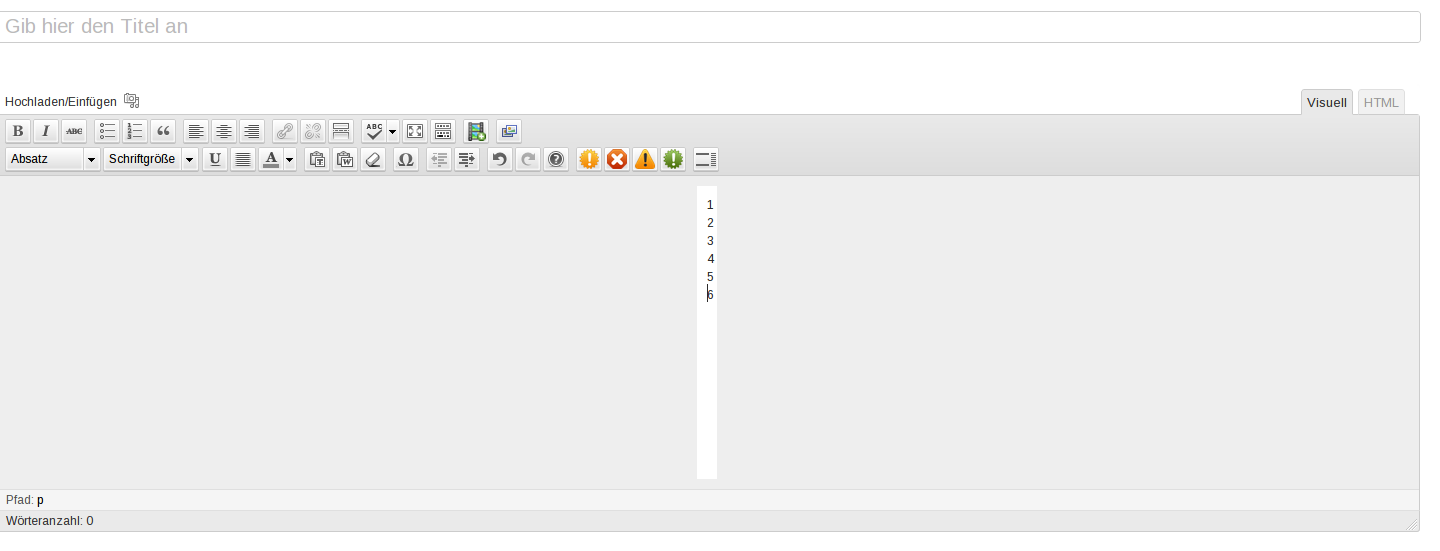
Visual editor (wysiwyg) with 1 char per line
-
Hello,
not sure why, but i can’t use the Visual editor with the latest Graphene on my WordPress 3.4.1. and Graphene 1.7.3.
The White part of the Visual editor is only 1 char wide:
Screenshot: http://files.pannek.de/wordpress.png
With a different Theme it works fine.
Thanks
Admin
Hurm.. Try resetting the column widths in Graphene Options > Display > Column Width Options.
Which value is 20?
I’m sure Syahir is correct in determining your column settings are probably incorrect.
However, I’m curious… what happens when you check this option:
appearance -> graphene options -> “display” tab -> miscellaneous display options -> disable custom editor styles
Does that restore the visual editor?
Just a note…
Understand that the custom editor stylesheet is intended to help the wysiwyg editor be more like the front end of the site. Especially with the custom column widths. The editor stylesheet will “mimic” the front end layout of your website.
Disabling this option does not harm your site… but it reduces the intended functionality of the theme.
If you are experiencing issues with this option enabled… then it’s probably because another plugin is attempting to also alter the tinymce editor stylesheet. You might want to first try de-activating plugins and see if you can find the culprit. In most cases, it’s probably a little more wise to lose the plugin… then intended functionality of the theme.


Viewing 8 posts - 1 through 8 (of 8 total)
- You must be logged in to reply to this topic.