
Site Title Showing
-
Hi,
I am having an issue that the site title is showing on the header image despite me not having the option ticked in the Site Identity section.
My site is https://newcastledistrictscouts.org.uk/I am using a child theme.
Thanks
Admin
What files do you have in your child theme?
Thanks for the reply.
I have these –
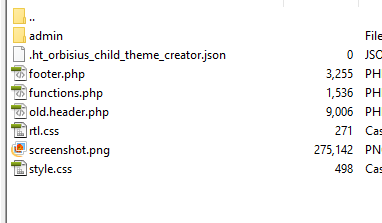
Thanks
Looks like your child theme is not loading the responsive CSS for the theme. Can you copy and paste the content of the functions.php file here?
<?php
/*
* Generated By Orbisius Child Theme Creator – your favorite plugin for Child Theme creation 🙂
* https://wordpress.org/plugins/orbisius-child-theme-creator/
*
* Unlike style.css, the functions.php of a child theme does not override its counterpart from the parent.
* Instead, it is loaded in addition to the parent’s functions.php. (Specifically, it is loaded right before the parent theme’s functions.php).
* Source: http://codex.wordpress.org/Child_Themes#Using_functions.php
*
* Be sure not to define functions, that already exist in the parent theme!
* A common pattern is to prefix function names with the (child) theme name.
* Also if the parent theme supports pluggable functions you can use function_exists( ‘put_the_function_name_here’ ) checks.
*//**
* Loads parent and child themes’ style.css
*/
function orbisius_ct_graphene_child_theme_child_theme_enqueue_styles() {
$parent_style = ‘orbisius_ct_graphene_child_theme_parent_style’;
$parent_base_dir = ‘graphene’;wp_enqueue_style( $parent_style,
get_template_directory_uri() . ‘/style.css’,
array(),
wp_get_theme( $parent_base_dir ) ? wp_get_theme( $parent_base_dir )->get(‘Version’) : ”
);wp_enqueue_style( $parent_style . ‘_child_style’,
get_stylesheet_directory_uri() . ‘/style.css’,
array( $parent_style ),
wp_get_theme()->get(‘Version’)
);
}add_action( ‘wp_enqueue_scripts’, ‘orbisius_ct_graphene_child_theme_child_theme_enqueue_styles’ );
Thank you
Try replacing the whole content of that
functions.phpfile with this code:<?php /** * Graphene Child Theme Functions */ function graphene_child_enqueue_styles() { wp_enqueue_style( 'graphene', get_template_directory_uri() . '/style.css', array( 'bootstrap', 'font-awesome' ) ); wp_enqueue_style( 'graphene-child', get_stylesheet_uri(), array( 'graphene' ) ); } add_action( 'wp_enqueue_scripts', 'graphene_child_enqueue_styles' );That’s sorted it.
Thank you for your help 🙂

Viewing 7 posts - 1 through 7 (of 7 total)
- You must be logged in to reply to this topic.
