
Display Home Page Graphene
-
Hello,
Excuse me for english, I’m a french man
I use the theme Graphene which is lovely!
Currently, I am printing the news on a column, each news is rectangular.
How can I view the news on “two columns”, each news is rather square?
See example below :
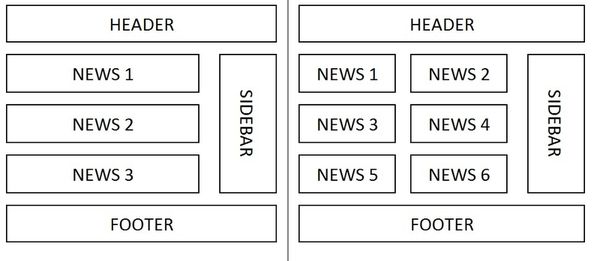
If anyone has an idea !
Best regards
Alain RONK
My website : http://www.modelisme-racer.fr
Hmm.. Good question.
The theme doesn’t really have a template for the design you are wanting to implement. You can create posts with different templates, such as two sidebars or no sidebars, however neither will split the main content area in half.
Are you wanting to do this on a post? Or a page? It can be done using div tags… but it is helpful to know some HTML.
Thank you for your reply !
I know, the theme does not provide that.
But how to write this change using CSS ???
Best regards
Alain RONK
My website : http://www.modelisme-racer.fr
Well, you can make two div elements in your stylesheet.. one to float left and one to float right.
#divleft {float:left;}

#divright {float:right;}
Then, in your content area… call each div accordingly.
<div id="divleft">YOUR LEFT CONTENT</div><div id="floatright">YOUR RIGHT CONTENT</div>Or you could just do it all inline, and not call from the stylesheet (although not preferred):
<div style="float:left">YOUR LEFT CONTENT</div><div style="float:right;">YOUR RIGHT CONTENT</div>You may need to wrap both of those in a separate div or span tag… depending on how it displays.
Thank you for your answer, Josh!
But I write this CSS code where?
Best regards
Alain Ronk
My website : http://www.modelisme-racer.fr
I wrote :
divleft # {float: left;} and # divright {float: right;}
in my style.css and,
<div id=”divleft”> news 1… </ div> <div id=”floatright”> and news 2… </ div>
in my content area
But, it’s not ok !
Best regards
Alain RONK
My website : http://www.modelisme-racer.fr
I tried with div and span, and it does not work.
And, I wrote : divleft # {float: left;} and # divright {float: right;}
in my style.css but, should I write in a specific location in style.css ?
Best regards
Alain RONK
My website : http://www.modelisme-racer.fr
<div style="width:100%;">

<div style="float:left;width:35%;">This is floated left. This is floated left. This is floated left. This is floated left. This is floated left. This is floated left. This is floated left. This is floated left. This is floated left. This is floated left. This is floated left. This is floated left. This is floated left.

</div>

<div style="float:right;width:35%;">This is floated right. This is floated right. This is floated right. This is floated right. This is floated right. This is floated right. This is floated right. This is floated right. This is floated right. This is floated right. This is floated right. This is floated right.

</div>

</div>
What I did here was wrap my code above in another div tag, and gave it a width of 100%. Then, I created two divs, floated one left and one right, and gave them each a width of 35% to give them space in the middle.
Yes Josh, I agree.
But in this case, the note is in two parts.
See the result here: http://www.modelisme-racer.fr
I would like two notes on one line, with two different squares.
I’m not sure exactly what you are trying to accomplish. What do you mean by “notes” and “squares”?


- You must be logged in to reply to this topic.
